
Lockdown Mode iPhone: What It Is, How to Turn It On, and Who Should Use It
Lockdown Mode Iphone is one of the most extreme security features ever added to the iPhone, but it is also one of the most misunderstood. Many users see the name and assume it is just another privacy setting. It is not.
Lockdown is designed for people who may face highly targeted digital threats, such as spyware, advanced hacking attempts, or state-level surveillance. For most people, it will never be necessary. But for users at higher risk, it can add an important extra layer of protection.
That is what makes it so interesting. It is not meant to improve convenience. It is meant to reduce risk by limiting certain functions that attackers may abuse.
What is Lockdown Mode on iPhone?
In simple terms, Lockdown Mode iPhone is a special security setting that hardens your device by restricting certain features, connections, and behaviors. Apple built it for rare situations where someone may be personally targeted by a highly sophisticated cyberattack.
That is an important distinction. This is not a mode for fixing common scams, weak passwords, or ordinary spam. It is meant for more advanced threats.
When you turn it on, your iPhone becomes more restrictive. Some apps, websites, attachment types, and communication features may not work normally. That trade-off is intentional. The idea is simple: fewer open paths means fewer ways for an attacker to exploit your device.
What does Lockdown Mode do?
It reduces the attack surface of your iPhone. In practice, that means Apple limits some system functions that could be used in advanced attacks.
Depending on the software version, Lockdown Mode may affect:
- certain message attachments
- some web technologies
- invitations and incoming requests from unknown people
- wired connections with accessories
- some shared albums or collaboration features
- specific wireless and network-related behaviors
You do not need to understand every technical detail to understand the purpose. iPhone Lockdown Mode is designed to make your device less flexible, but harder to attack.
That is why it is not enabled by default. Most users would find some of those limits unnecessary in daily use.
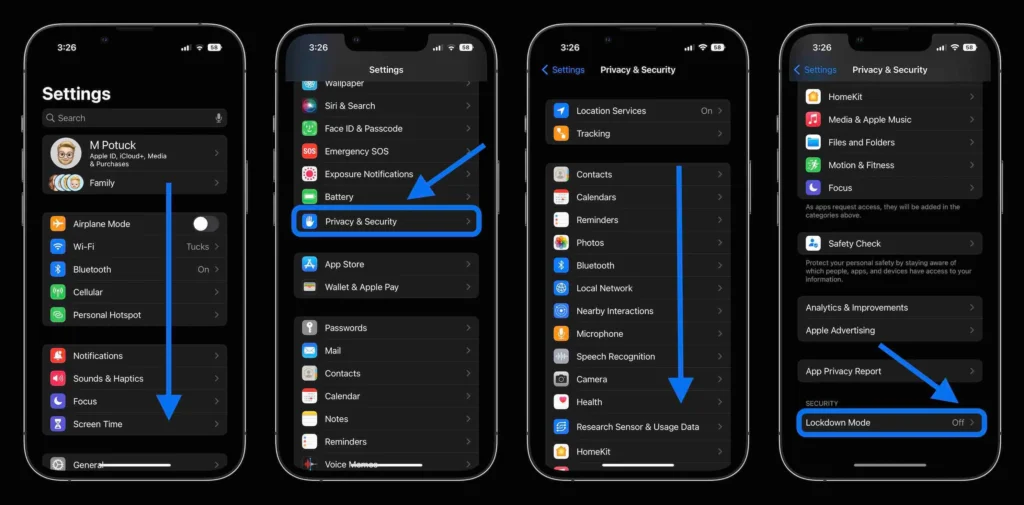
How to turn on Lockdown Mode on iPhone
If you want to enable it, the process is simple.
Follow these steps:
- Open Settings
- Tap Privacy & Security
- Scroll down to Lockdown Mode
- Tap Turn On Lockdown Mode
- Confirm again
- Restart your iPhone
Once the phone restarts, Lockdown Mode will be active.
Where is the Lockdown Mode option on iPhone?
If you are searching for the show lockdown option setting or wondering why you cannot find it, the answer is usually simple: it should appear inside Settings > Privacy & Security.
If you do not see the Lockdown Mode option, check these things:
- your iPhone software may be outdated
- your device may not support the required iOS version
- you may need to update first before the option appears
Who should use Apple Lockdown Mode?
This is the most important part of the article.
Most iPhone users do not need Lockdown Mode. If your main risks are normal phishing emails, weak passwords, or random scam texts, this is probably not the feature that matters most. In those cases, stronger everyday habits will help more:
- keep iOS updated
- use strong passwords
- enable two-factor authentication
- avoid suspicious links
- improve cybersecurity awareness
It makes more sense for people in higher-risk roles, such as:
- journalists
- activists
- politicians
- lawyers handling sensitive cases
- executives
- researchers
- people who may be targeted by advanced spyware
If that does not sound like your situation, Lockdown Mode may create more friction than value.
Final thoughts
This feature is a serious security feature built for serious threat scenarios. It is not a general-use privacy toggle, and it is not something every Apple user needs to activate.
Still, it matters because it shows how mobile security is changing. Apple is openly acknowledging that some users need much stronger protection against advanced threats. If that applies to you, is worth understanding. If not, the smarter move is to improve your day-to-day security habits first.